Author: admin

  • Virtual Reality and e-Learning

    Virtual reality uses various technologies to create an all encompassing simulation of an environment, which can yield great results for learning and development. VR has been used with great results in the healthcare, science, research and training areas.  

    More and more we are seeing new uses for virtual and augmented reality, but this technology has been around for quite a few years in some form. Virtual reality is the term used to describe an immersive experience through a computer generated environment which doesn’t actually exist. Our senses give us the perception of how we view the world around us. Everything we know about reality comes from what we have learnt through our senses. 

    Virtual reality uses various technologies to create an all encompassing simulation of an environment, which can yield great results for learning and development. VR has been used with great results in the healthcare, science, research and training areas.

    The use of virtual reality can be traced back to the mid 1800s. Charles Wheatstone researched the idea that the brain is processing two, two dimensional images to create depth of view, so we can perceive the world in three dimensions. The research concluded that viewing two images through a stereoscope provided a sense of immersion and depth.

    Augmented reality on the other hand does not create a virtual world, but rather imposes holograms on the users environment. The term augmented reality came about in the 1990’s, with Thomas Caudel using the term to describe the head mounted displays that electricians wore whilst undertaking complex assembly work. Many new AR apps are being released, which are mixing computer generated images with the real life environment. AR Google Maps is a good example of what can be achieved for apps of this kind.

    For Learning purposes, VR can be used to mimic the environment the student will be working in. This means the student can interact, manipulate objects or carry out a series of tasks, for the purpose of training and gaining experience. For example a mockup of a workplace.

    Education is an area that has great applications and opportunities for virtual and augmented reality. Learning is conducted much more efficiently, is more engaging for the user and can be a fun experience too. Primarily these technologies have been seen in the gaming industry, but studies have shown using VR/AR in the training realm has significant benefits.

    Virtual reality enables the student to enter a 360 degree video shot or immerse themselves in a 3D environment. A great example of this technology is the VR training for marine biologists. They can enter into the natural environment of the ocean all without stepping foot near a boat or the coast. The lecturer will activate a series of scenarios and wearing virtual reality glasses, the students can experience the actual environment. Virtual learning environments are also created in online education where students can send, create and manage coursework, as well as study digital material.

    The benefits and drawbacks of using VR and AR in eLearning

    Over the last few years, VR has really taken center stage as a great innovation in the world of learning and eLearning. The delivery of this sort of training will have an upfront cost (from purchasing VR headsets and Smartphones for example). 

    The Benefits of Virtual Reality

    Realistic Scenarios 

    The nature of virtual reality means that trainers can enhance learning content and create a remarkably interactive learning experience.

    Mistakes 

    With virtual reality technology it does not matter if the student were to make a mistake, it’s just a part of the learning process. In certain training situations such as nursing for example, it would be impractical not to mention dangerous, for a student nurse or doctor to train on a real patient. With VR, trainers can replicate a real life scenario, but the trainee is safe knowing that they cannot harm a ‘virtual’ patient.

    Suitable for different learning styles 

    This type of learning can really help people who benefit from a more tactile style of learning and who struggle with the theory side.

    Resource Saving 

    Setting up training in a traditional training environment can be costly and take up a lot of room. VR offers trainees a safer environment, which can also use less floor space than a full sized mocked up environment. This space can also be converted to be utilized in another way while training is not in progress.

    Innovative and Enjoyable 

    Elearning specialists are always looking for cutting edge ways to deliver their training and using virtual and augmented reality is making the whole learning experience more enjoyable and immersive. It can be used in many different scenarios, from customer service to teaching, healthcare and even engineering.

    Drawbacks of Virtual Reality

    Integration

    For the moment, it is quite difficult to convert all learning types to virtual and augmented reality, as it requires a lot of resources to convert and test VR/AR products. For this reason, careful consideration is required when choosing which courses to convert and where this technology will have the most benefit.

    Costly 

    Even though there are virtual reality devices to suit all budgets, investing in VR for large scale training is a real wallet drain, particularly when the training needs to be delivered to many students or employees.

    Training Locations 

    With traditional eLearning, a student can learn quite effectively and quietly sitting at a desk. With VR the trainee will need more room to function, so there is no risk of falling over desks or bumping into chairs. Due to this an employer or training provider will need to provide suitable space for the trainee and the VR equipment.

    eLearning into the future

    The future of eLearning is evolving and set to advance further, with VR and AR applications bringing two technologies that will enable this to happen. These technologies can facilitate the learning process in various ways, particularly in industries which involve more complex and/or high risk practices.

  • How VR Is Revolutionizing The Material Handling Industry

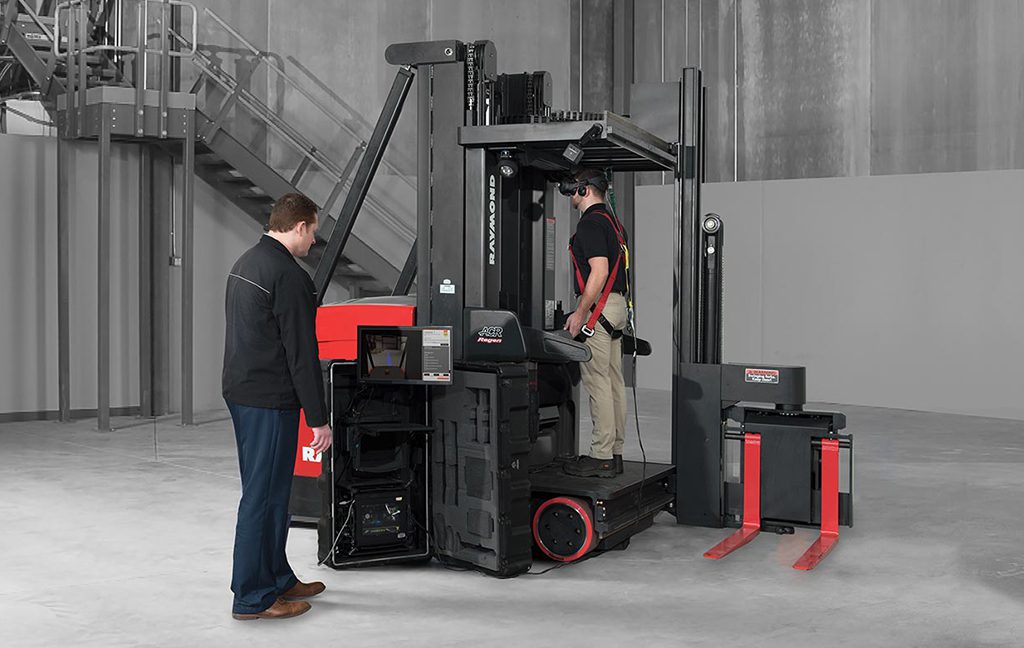
    Operating a forklift with efficiency takes a lot of skill and can take a long time to master. It can take a lot of practice for a trainee to become confident in his/her abilities. Raymond Corporation, who is a subsidiary of Toyota and is a large supplier of forklifts are looking for a better alternative.  

    Operating a forklift with efficiency takes a lot of skill and can take a long time to master. Driving a forklift requires good spatial awareness, especially in a busy commercial/industrial environment. Think about training new drivers in such an environment, filled with risks and fraught with danger, it is not something that can be conducted willy nilly. Someone could get hurt, seriously injured or even killed if the trainee were to make a mistake. Forklifts are heavy equipment and care is needed while under operation. It can take a lot of practice for a trainee to become confident in his/her abilities. Raymond Corporation, who is a subsidiary of Toyota and is a large supplier of forklifts are looking for a better alternative.  

    Stacey Patch is Raymond’s Virtual Reality Simulator Business Manager. Her team have the task of designing a VR simulator. They have looked at various different VR project from around the world, across different industries from flight simulators to medical training simulations. It’s clear to see the potential advantages of this technology for forklift training. Patch goes on to say, “Looking at the way this technology has been used to enhance training in many industries, we realized the same benefits could seamlessly be carried over into the material handling industry”. The team settled on an exclusive partner FreeRangeXR located in Sausalito, California. Also discussed was using the HTC Vive as it ticks all the boxes the simulator needs. The main reason the Vive was chosen was because it offers good enterprise solutions and has extended support.

    Studies have shown that using simulators to train workforce offers better learning retention and greater confidence going into the job. It is also proven that this is a cheaper alternative to standard training. Researchers at Iowa State University have studied VR training in welding simulations with the results showing a massive 41.6% increase in certifications and a 23% decrease in training time overall.

    The Raymond simulator was showed off at SXSW last march. The physics were true and you could feel the interaction. When you turn you can almost feel the momentum of the heavy machine. It gets your heart pumping when the fork virtually ascends into the air to grab a heavy pallet. Virtual Reality Apps of this kind are really turning heads and the market space is ever growing. VR is a powerful tool when it comes to realistic, intensive training. One of the best things about this simulator is that it’s actually quite fun to use, which of course aids in the training process. VR training is becoming more and more commonplace.

    The CEO of Raymond, Micheal Field said “In developing the Raymond Virtual Reality Simulator, we saw an opportunity to help avoid potential product and warehouse damage while increasing overall productivity and efficiency,” he also states “At the same time, we wanted to advance best practices in next-generation manufacturing as well as use technology to pique the interest of younger talent and use the simulator as a key tool for recruitment.”

    The greatest thing about Raymonds simulator, is that similar to a flight simulator using real plane cockpit, it utilizes the actual forklift they will be using. Because of this, every gauge is in its place and controls are in the correct position. Raymonds VR simulator can be added to any of Raymond forklifts, either brand new or existing forklift models. This is the first simulation of its kind as it interfaces with the actual forklift and is using “sPort (simulation Port)” technology. 

    This innovation has earned the Raymond company its place on Fast Company’s 2019 Most Innovative Companies list in the categories of virtual and augmented reality. Raymond also picked up the International Intralogist and Forklift Truck of the Year award and also won an Edison Award, quite a haul and a great result. There is now no question we will be seeing more and more VR products of this kind being used in a variety of training applications.

  • Porting to the Oculus Quest – Part 2

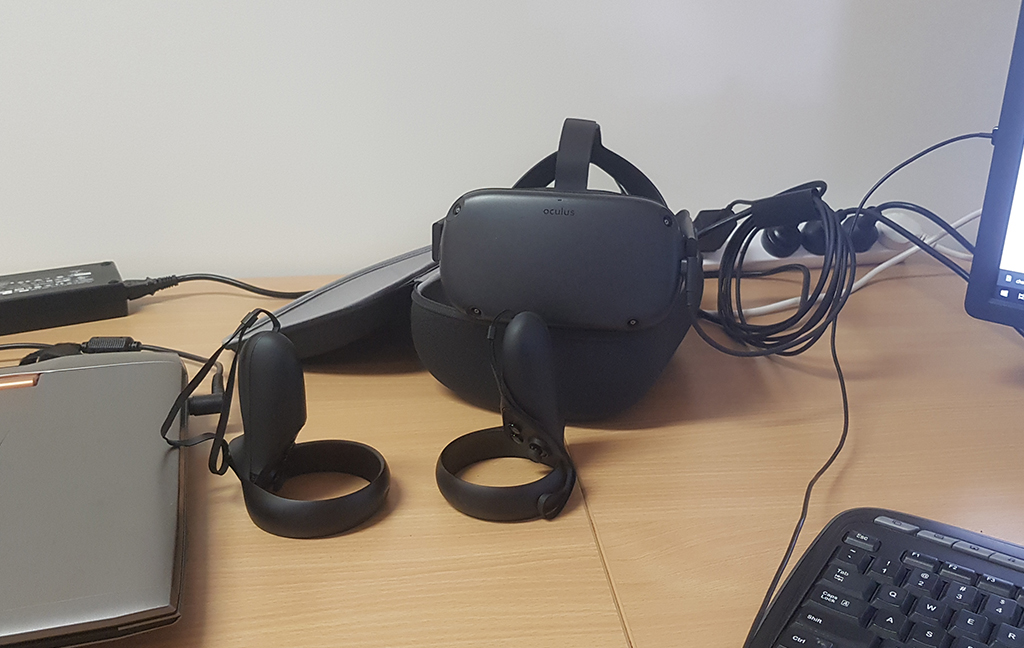
    Just to give you some context to how amazing this is, this model is a to scale 3D model of my house. The reason I am so blown away by the demo is that I am actually walking around my house when I recorded this video. The Oculus Quest tracking did not drift even the slightest bit.

    Not surprisingly, nothing went as smoothly as I was hoping. Once I got into Unity and began the process of converting our current PC VR projects to Android, I was met with a mix of Unity bugs, bad setting configurations and just crashing for reasons that I have yet to figure out.

    I only had a very short window to get something up and running on the Oculus Quest before I had to move on to other projects. I was looking for a quick turnaround so I attempted to convert our most basic package to the new platform. After waiting for what felt like hours for Unity to switch over to the Android platform, I removed all the old cameras from the scene and installed the latest Oculus SDK. I published it to the Quest and to no one’s surprise, it crashed! Instead of spending too long debugging this I decided to start fresh with a new Unity project, import the models and publish again.

    While I was creating the new project, I noticed something new, Unity has a new render pipeline specifically designed for low powered devices. I did a little research into it and got really excited; they were promising up to 100% gains in performance. Knowing how unoptimized the current render pipeline is, I believed them. But of course, nothing is that easy. There seems to be a bug with the package when exporting it to Android. Right at the end of the build process an error would pop up, “Return of the style/VrActivityTheme not found in AndroidManifest.xml” great! I did a bit of research and came across this forum thread. The general consensus seems to be that it will get patched in future releases of Unity. As seems to be the theme of this post, I didn’t have time to look further into the issues and since it is not critical to what I am wanting to achieve, I’ll put the new pipeline on the back burner. I will definitely keep an eye on it though as I’m not one to ignore a free performance increase!

    Back to just trying to get anything to run on the Quest. I created a new project and started with just a cube and the Oculus SDK. I published it to the Quest and I was a little surprised this time, it still crashed instantly. I expected that the default Unity configuration combined with the Oculus SDK would be enough to get it going, I guess I was mistaken. Back to google, and it looks like I’m not the only one having these issues. I found the answer in this thread. It turns out Unity defaults to an incompatible render API. I removed Vulkan from the list and it worked! Now all I needed to do was import my model into the scene and publish to the Quest. You can see the fruits of my labour below. It performed excellently! I’m very impressed.

    Just to give you some context to how amazing this is, this model is a to scale 3D model of my house. The reason I am so blown away by the demo is that I am actually walking around my house when I recorded this video. The Oculus Quest tracking did not drift even the slightest bit. I managed to walk through every room in my house, while wearing the headset, without bumping into any walls! Just as another note, no I didn’t put any time into lighting the scene, I just used what I had set up in Cinema 4D. Ignoring that the scene is a little blown out, I am surprised how great the scene looks and how well it ran with these unoptimized models.

  • iTRA Spatial Mapping Tags

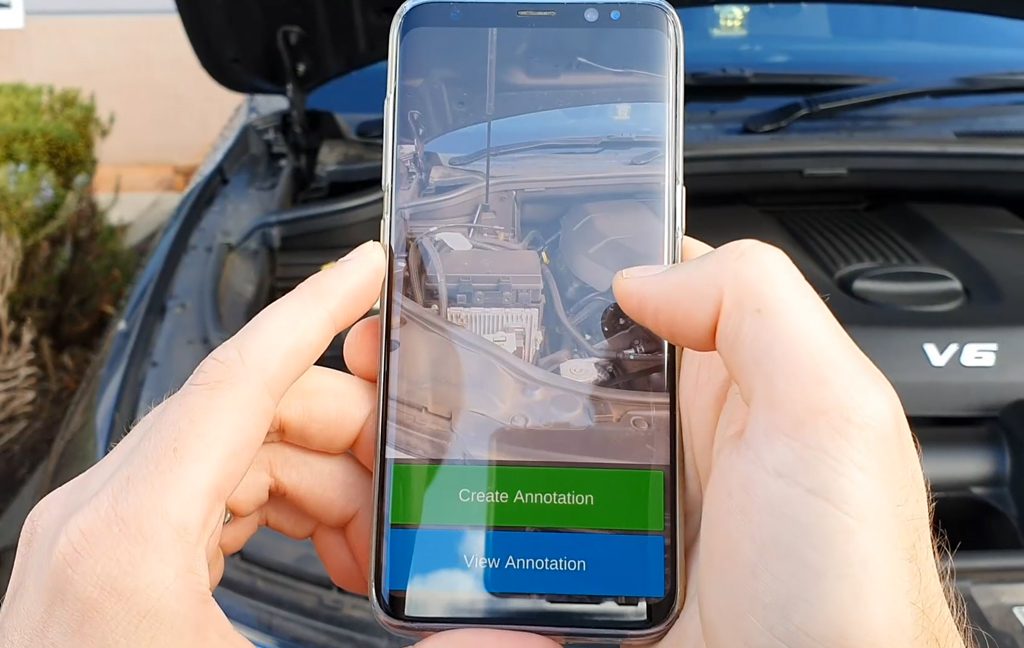
    Place persistent AR markers in the real environment and share them across devices for collaboration. No ugly QR or AR stickers needed. The app recognises your environment and loads previously created tags from cloud.

    Place persistent AR markers in the real environment and share them across devices for collaboration. No ugly QR or AR stickers needed. The app recognises your environment and loads previously created tags from cloud.

    Applications made with this technology connect the physical world with digital assets and will change how we live and work. The possibilities are endless, tags can show real-time data from SCADA or IoT systems too.

    Watch this space, more videos coming.

  • Benefits of Converting Flash to HTML5

    It is true that Flash will be making a swift exit in 2020. It means, if you have not already started converting content, it is time to do so. Don’t worry this process will not be as difficult as you might be thinking.

    Benefits of converting Flash to HTML5

    It is true that Flash will be making a swift exit in 2020. It means, if you have not already started converting content, it is time to do so. Don’t worry this process will not be as difficult as you might be thinking. It is important to plan the conversion process well to reap the full rewards this conversion can give. Check out our previous Flash article for more information about how to tackle the conversion.

    It is now essential to convert courses to HTML5, so knowing this work needs to be done, why not make the most of it?

    Below are some key benefits this conversion will bring to your business:

    Get to a bigger audience with HTML5

    Organizations will be able to connect with a wider audience with HTML5. These days not many mobile devices are able to use Flash due to the lack of support for it. This means you are preventing a lot of your potential audience from being able to view your courses. Some Flash-based courses will not even run on browsers like Firefox or Internet Explorer, as the Flash plugin needs to be downloaded. HTML5 does not require you to download a plugin, which means it’s compatible with all modern browsers.

    eLearning on any device

    HTML5 is much more efficient as it has significant optimizations over Flash. In the past, Learners have needed to use a desktop or laptop for more graphics intensive courses. Courses that have been converted to HTML5 will not only run faster but will work on mobile devices such as smartphones and tablets. Best of all, HTML5 guarantees the courses will look just the same on any device.

    Learn on the go

    The world is becoming a busier place with technology coming out of the wazoo. It’s important learners have the opportunity to view courses anywhere at any time and HTML5 provides this. It consumes less bandwidth than the Flash-based courses, and also uses less power which makes it perfect for mobile devices.

    HTML5 Offers offline learning

    Sometimes Employees need to be away from their normal work stations. They could be on the move with sales work or working in remote areas such as oil rigs, not to mention areas without good internet coverage. This is where offline learning really has its place. eLearners need the ability to be able to download their courses enabling use at a later date.

    Increasing your ROI

    The conversion from Flash to HTML5 makes good business sense. Its an opportunity to refocus content, revamp existing content or remove irrelevant content. Using outdated courses means a lot of online resources are going unused due to lack of browser support for Flash format. Flash to HTML5 will also affect ROI in a positive way. This is because existing content can now be made mobile-learning compliant and overall content will be enhanced.

    Improving the learning culture

    Because HTML5 is accessible on multiple devices, eLearners now have the ability to learn wherever and whenever they want. No longer does training have to take place on a certain day or time (business hours). Learners can now take their eLearning material home even without a desktop or laptop computer. Just a tablet or smartphone will be sufficient. This aids in developing a great learning culture within an organization.

    eLearning for the future

    The period of conversion from Flash to HTML5 offers the perfect time to update all eLearning content. Whether you are reusing existing content or completely rebuilding a course from scratch, finding the right tool will help make the conversion process a lot easier. With popular choices such as Adobe Captivate, Trivantis Lectora and Articulate Storyline, eLearners will be happy they will no longer have to download plugins for each different device they use with HTML5. By converting from Flash to HTML5 you are not only improving the experience for eLearners, but are also future-proofing the eLearning content.

    In summary, no matter the state of your content, It is possible for it to be converted, or completely rebuilt in HTML5. The quicker you make a strategy and start this conversion, the sooner you will reap the rewards this process will give your business.

  • Porting to the Oculus Quest – Part 1

    The plan is to port all of our existing applications to the Quest, without giving up too much of the quality and complexity in our scenes. Given that we are essentially porting to a mobile processor, this is going to be a big challenge.

    Since Oculus announced the shipping date of the Quest in April, I have been eagerly awaiting the arrival of our headset. It’s inside-out approach to tracking is intriguing and with the prospect of no more umbilical cord attached to my head, there is a lot to be excited about.

    Everyone who has tried Virtual Reality with us has been really excited by what the technology is capable of, not only now, but what it has the potential to become. A huge draw back thus far has been the cost of the device, coupled with the need for a beefy gaming computer to run the software. This is why the Quest has got everyone, including myself, so excited. Without the need to do the computing externally the barrier to entry is dramatically reduced.

    The plan is to port all of our existing applications to the Quest, without giving up too much of the quality and complexity in our scenes. Given that we are essentially porting to a mobile processor, this is going to be a big challenge.

    I have been working with the Oculus Rift and HTC Vive for the past 3 years using the Unity Engine. It has been great having the performance of a desktop computer powering the headset, but sometimes it is still a struggle to get certain experiences to run smoothly on these devices. I am going to need to double down on optimization, both for the models and code if I want to get these applications running smoothly on the Quest.

    Before I begin this daunting task, I want to play around with a 3rd party application, VRidge Riftcat, which I’ve been following ever since I got my first Google Cardboard. The software essentially renders the game on your desktop computer and streams it over WIFI to another device, be it a phone in Google Cardboard or a Gear VR. This is a great solution for having high performance experiences in cheap, portable headsets.

    After playing around with Riftcat I am quite impressed. They managed to include full Steam VR compatibility, including their room scale guardian system with 6 DOF controllers. This must not have been an easy accomplishment. Unfortunately, this is clearly still a beta. The tracking was flawless (apart from a little latency, but I can forgive them for that) but the quality of the visual stream was a bit lackluster. It suffered from numerous dropped frames and image compression if the WIFI signal degraded even a little. I am going to keep an eye on the project in hopes that they overcome these shortcomings, but for now, I can’t recommend this to clients as a solution.

    It looks like I better open Unity and get porting!

  • Flash is Dead: Upgrading To HTML5 Isn’t As Hard As You Think

    It’s time to have a good think about converting all your legacy Flash courses to HTML 5. Adobe now has your back against a wall regarding conversion. Until now you have been able to use your Flash courses by temporarily unblocking Flash Player, but it’s imperative to update your courses to keep up with a tech fueled, ever-changing world.

    It’s time to have a good think about converting all your legacy Flash courses to HTML 5. Adobe now has your back against a wall regarding conversion. Until now you have been able to use your Flash courses by temporarily unblocking Flash Player, but it’s imperative to update your courses to keep up with a tech fueled, ever-changing world. See our Flash End Of Life post for more details. This may seem quite daunting at first, but it will give your courses a more modern look and feel, not to mention improving efficiency. This will give your business an edge in this crowded landscape.

    It may seem like an impossible task to convert all your content to HTML 5. But with the right plan, not only can you retain all your courses, but also evaluate any gaps that are existing in your e-Learning content, which refreshes the experience that your content deliverers.

    Categorize your courses

    Converting courses does not always mean you have to recreate them from scratch. First of all, you can prioritize all your courses into the following categories:

    1. Courses that meet the learning objectives desired by your business, which only need a technology update.
    2. Courses that mostly meet the learning aspirations your business desires but can do with some small visual enhancement.
    3. Courses that need to be totally reworked with an updated instructional and visual approach.

    While your legacy courses need to be converted, they are not superfluous. They become the foundation on which your new courses will be constructed. Putting your courses into these categories will help you understand just how to attempt the conversion program ahead.

    Ask the Correct Questions

    After you have given the above some thought, you now need to ask yourself a few questions:

    1. Can you do this work internally, or will you need to outsource some of this work?
    2. Do you have a budget in place for this plan?
    3. Do you have a plan to reintroduce the upgraded courses?

    Choosing Partners

    Once you have chosen the correct strategies for your business it is important to keep in mind the needs of your learning content. The conversion of a high volume of content can be tedious and take a lot of time. This is where you need to consider the capability of your team. If extra manpower or technological skill are needed, there are professional e-Learning vendors that have helped accomplish this task many times before. Outsourcing some or all of this work will help your business move forward with this migration in an efficient and timely manner. Choosing a good partner to complement your business through this migration period is key to succeeding in a smooth transition.

    The benefit of outsourcing is that you will work with a committed team of professionals. These are people who specialize in Visual Design, Programmers, Solution Architects, Industrial designers as well as Quality Assurance personnel and End-to-end product management. With these professionals, you can make a customized plan to suit your business needs.

    Create focus groups to delegate workload effectively

    Using the three categories spoken about earlier, it is possible to create focus groups to tackle the different courses that need a particular treatment. It is a good idea to have good communication among these different focus groups, to ensure the overall quality and completion of the project in the time frame required.

    Which technology is right for your business?

    As you will be upgrading and enhancing your courses, it is important not to lose the main objective of your courses, make sure not to lose the initial purpose of the e-Learning courses during the conversion. With the right team and authoring tools working on this project, you can ensure you do not lose sight of your goals.

    Often, the conversion of your legacy courses can be as easy as upgrading which tool you are using to build your courses. Asking professionals in this field can help you quickly identify the new tools you need moving forward.

    Some examples of tools being used today are:

    1. Adobe Captivate
    2. iSpring
    3. Articulate Storyline
    4. Lectora

    Start with a prototype

    Another important part of this process is starting with a prototype. This will help decide the look and feel you desire for your course updates. Having a prototype stage, really does help you find potential problems as early as possible, crucial when dealing with a high volume of courses. The prototype will become the groundwork that all your courses will follow. This aids with the overall flow of work to be done and helps reduce delays in the roll out of your courses.

    Test everything

    When dealing with a high volume conversion project, it is imperative that you test all courses. Check for things like the visual design and functionalities of each converted course to ensure nothing has been overlooked.

    Keep in mind your systems may need to be upgraded as well. Check that your current infrastructure has the ability to support the new courses. If your infrastructure does not support HTML 5, it will need to be upgraded. We reported on Microsoft’s recommendations for which technology to use last week. Once again professionals in this field will be helpful in assisting with this process.

    Over-all, converting all your courses in one single project can be a great achievement. By using the discussed approach, with the right partner and team of professionals, a successful outcome can be achieved. At the same time, this is the opportunity to give all your courses a face lift and bring them in line with the most modern and up-to-date courses out there.

  • Oculus Quest: Breaking Down All Barriers to Entry

    We all remember the Oculus Rift when it was released back in 2016. It was a smash hit but now it’s 2019 and people want more. As a result, Facebook will be releasing Oculus Quest on the 21st of May this year retailing at $399 USD, which represents good bang for your buck.

    We all remember the Oculus Rift when it was released back in 2016. It was a smash hit but now it’s 2019 and people want more. As a result, Facebook will be releasing Oculus Quest on the 21st of May this year retailing at $399 USD, which represents good bang for your buck.

    Similar to last year’s Oculus Go, it features a standalone design meaning it does not need to be hooked up to a PC or phone. The Oculus Go was designed to be used to watch TV or movies, whereas the Oculus Quest is designed with gaming and enterprise in mind.

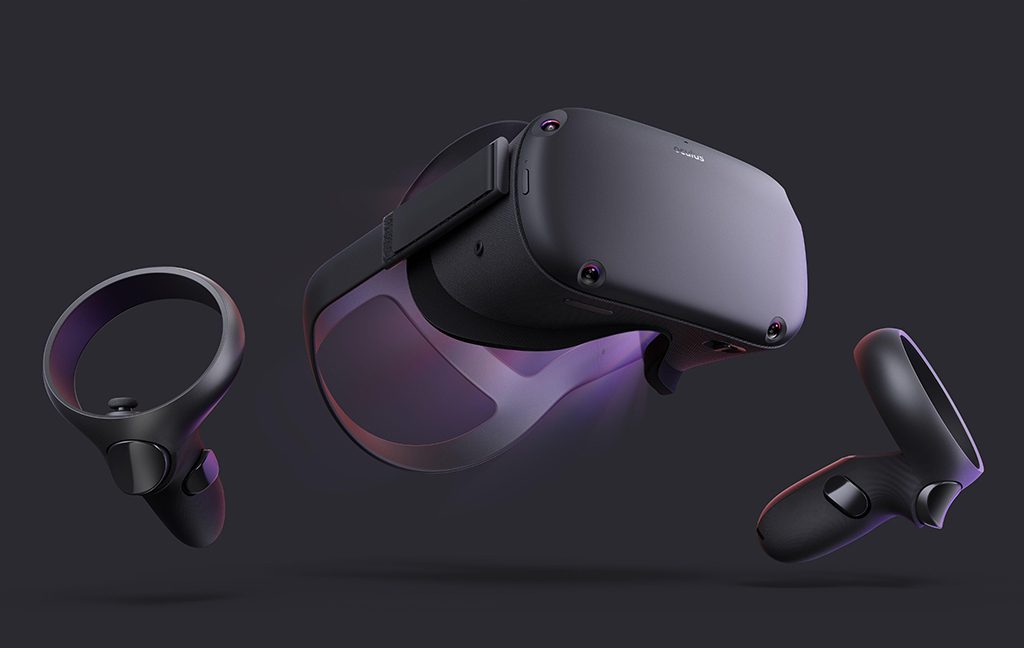
    Some features that are included in the new Oculus Quest are its four wide-angle tracking cameras, allowing the user to move around in a large space. The Quest utilizes dual hand controllers and has a slider for adjusting the distance between the lenses. Oculus has improved the sound quality by adding powerful invisible directional speakers, which also makes the design sleeker. For processing power, it uses a Qualcomm Snapdragon 835 mobile chipset with 64GB or 128GB of storage. For recharging the Quest’s batteries, there is a USB-C charging port, with this battery lasting up to 3 hours. The Quest is using much higher resolution screens than the Rift’s, at 1600 x 1440 pixels per eye and boasts enhanced lenses. But best of all the Quest is completely wireless, so no more tripping over cables. These features are great improvements, which makes it easier to use, therefore will have more mainstream appeal.

    The Quest now uses the new “Insight” system, which allows the cameras to detect the edges of your space more effectively. The cameras have the ability to also pass monochrome video to your display, meaning you do not need to remove the headset to see what is going on around you. This system works more effectively, mapping spaces quite easily. Normally to calibrate the boundaries, you will need to walk around your room, but the Quest will calibrate and paint virtual lines on your floor, from wherever you are standing.

    Another great feature of the Quest is its ability to remember up to five spaces. It will automatically switch between them once it detects a room from its memory, allowing free movement around the rooms, without having to recalibrate for each space. Oculus has put on display the “arena-scale” VR using the Quest, the possibility of limitless virtual motion is now getting to be a much more achievable goal.

    The controllers look a bit different to the old ones that Rift was using, This is due to having the tracking strip flipped from below to above your hands, so the head-mounted cameras are better at tracking it. Over-all the controls have not changed a great deal. Some subtle changes are the analog stick, which has been positioned higher on the controllers and the controller’s face being marginally slimmer, as Oculus has eliminated the capacitive Touch panel. This panel in the past was used to detect the user’s thumb placement.

    Oculus want to reach a bigger audience and are planning to build Enterprise Editions of their Quest and Go headsets sometime in 2019. This is nothing new for Oculus who have already made a similar approach to this market with their Rift. The main aim for Enterprise Editions is to enable businesses to bulk buy, allowing secure business applications to be installed onto the Quest and Go.

  • Microsoft Cybersecurity Expert: Please, Stop Using Internet Explorer As a Web Browser

    Internet Explorer has certainly passed its use by date. Not only does it look and feel old hat, but in 2015 Microsoft chose to discontinue it. Microsoft would like all users of Internet Explorer to refrain from using it and switch to a more up-to-date browser.

    Internet Explorer has certainly passed its use by date. Not only does it look and feel old hat, but in 2015 Microsoft chose to discontinue it. Microsoft would like all users of Internet Explorer to refrain from using it and switch to a more up-to-date browser.

    Since 12th of January 2016, Microsoft has not provided security updates, which patch vulnerabilities that can be exploited by malware, or any technical support for Internet Explorer. This means IE is unable to protect its users from new threats, so your data is not always safe. Regular security updates are needed to protect computers from malicious attacks.

    Without these critical security updates, your PC does become vulnerable to harmful viruses and spyware, along with other various malicious software, which can steal your business data and information.

    Chris Jackson, Microsoft’s cybersecurity expert explains that Microsoft customers still ask Internet Explorer related questions regarding business. The majority of internet users in this day and age use up-to-date browsers like Google Chrome, FireFox, or Microsoft’s Edge. The problem that some businesses have is that their older web apps or websites were designed for Internet Explorer. Using Internet Explorer today is just a ‘compatibility solution’.

    Jackson goes on to say he doesn’t even consider Internet Explorer to be a browser, at least in the modern standards-based sense. He does clarify that it’s still fine to use IE where necessary, just that companies should not be using IE as its default browser. Internet Explorer is still necessary for some enterprise solutions.

    “You see, Internet Explorer is a compatibility solution,” wrote Jackson in the blog. “We’re not supporting new web standards for it and, while many sites work fine, developers by and large just aren’t testing for Internet Explorer these days. They’re testing on modern browsers”.

    “So, if we continued our previous approach, you would end up in a scenario where, by optimizing for the things you have, you end up not being able to use new apps as they come out. As new apps are coming out with greater frequency, what we want to help you do is avoid having to miss out on a progressively larger portion of the web.”

    Jacksons warning is fair, but Microsoft hasn’t given businesses a great alternative. Microsoft released its Edge browser around four years ago, which was coupled with Windows 10. But Edge still continues to need Internet Explorer for the corporate intranet and you still need Internet Explorer to run older, less secure technology. Also, Edge has not been available on Windows 7 or Windows 8, which made things more complicated for IT admins.

    Microsoft has tried a few different methods to help businesses improve their older web apps, but for the most part IT admins have taken the easy way out and continued using Internet Explorer, as it has various compatibility modes that they need.

    When Edge released, it offered incredible performance and was a viable alternative to Chrome and FireFox. The problem was, Edge never really caught on in the same way that Chrome did when it was first released. Edge did not support legacy technologies and only offered IE 11 for enterprise solutions.

    Microsoft is now making the Edge browser Chromium-powered, which basically means it’s basing it on the technology Google use in their browser, Chrome. It’s quite clear Microsoft acknowledges that Chromes market share makes it the standard for today, for the everyday web user to IT admins. Edge is also being decoupled from Windows 10, which means users will now be able to download and install Edge on Windows 7, Windows 8 and even Mac. In doing this, it should help businesses progressively move away from using Internet Explorer. It will still take a few years for all legacy web apps to disappear completely.

  • iTRA Virtual Reality Project – Use of Fire Extinguishers

    Building upon the success of the VR Prestart Light Vehicle Check which rolled out late last year, we have been working with one of our clients to enhance their Fire Extinguisher training by creating 3 Virtual Reality scenarios for their employees to experience.

    Building upon the success of the VR Prestart Light Vehicle Check which rolled out late last year, we have been working with one of our clients to enhance their Fire Extinguisher training by creating 3 Virtual Reality scenarios for their employees to experience.

    While giving the trainees (virtual) hands on time with the extinguishers to better prepare them in the case of an emergency situation, our client also gains insight into their employees’ knowledge of which extinguishers to use and their effectiveness at extinguishing a fire. This data is collected throughout the 3 scenarios and sent back to TrainTrac for analysis. As an added bonus, the data is also presented to the trainee as a score which is added to a site wide leader board. This encourages competition between the employees and an incentive to do the training again to beat their co-workers score.

    During the prototype stages of the project, we built a similar experience for the HoloLens, where a pallet fire would be placed in the real world using Augmented Reality and a trainee would use a virtual fire extinguisher to extinguish the fire. The benefits of this is that you can practice each scenario in the actual location that a real-world fire would occur. However, this approach does have added complexities and lacks the immersion that Virtual Reality provides. Ultimately our client ended up going for the Virtual Reality approach.

    You can see demos of our other Virtual Reality showcases on our Virtual Reality page.