Author: admin

  • Improve Mine Productivity with Augmented and Virtual Reality Technologies

    Augmented and Virtual Reality technologies have been around for a while. The potential for these technologies are endless. Mining companies have embraced VR/AR for some time and are always looking to do more. Currently these technologies are, for example, reducing equipment maintenance costs and offering their personnel a safe way to train.
    Augmented and Virtual Reality technologies have been around for a while. The potential for these technologies are endless. Mining companies have embraced VR/AR for some time and are always looking to do more. Currently these technologies are, for example, reducing equipment maintenance costs and offering their personnel a safe way to train.

    AR and VR technologies are being used widely at both the consumer and commercial levels. Companies like Microsoft and Google are developing their own VR/AR technologies and are competing for their market share. The VR/AR industry is predicted to be worth more than $150 billion worldwide by 2020.

    Mining industries utilized VR/AR quite early, as the potential for training is ground breaking. Using these technologies for training not only saves companies money but has been proven that it can be a better way to train employees.

    Mining operators have realised the potential to address many issues with VR/AR technology, with improvements in productivity, safety and machinery uptime to name just a few. For mining companies, AR offers training in the real world with helpful overlays. VR replaces the real world with a simulated training environment.

    EMIMSAR, an EU funded project, is a system that allows miners to be able to view AR versions of complex equipment on helmet mounted displays. Using sensors to record and analyse temperatures, rates of acceleration and sample noise from sprockets. This allows staff to assess heavy duty components like gears and chains. This data is then given to a knowledge based maintenance system. When combined with background data on components, it creates real time virtual visualisations on the machinery which can be viewed by other miners while working on the same machine.

    The EMIMSAR AR system has been developed and used to great success by Germany’s largest coal mining firm RAG, which used it for maintenance planning, loaders and belt conveyors.

    Kumba Virtual Reality Centre, which opened in August 2015 has incorporated a 3D stereoscopic theatre and a 3D, 360° cylinder theatre. The 3D simulation creates true to detail mining conditions and creates scenarios such as underground rock falls, that is truly immersive experience for the user.

    Rio Tinto has now partnered with New York based Bravo Media to custom design the Oculus Rift experience. It features a computer generated environment that allows the user to fly above the coast of Canada, before taking you for a tour down the Diavik diamond mine.

    Grey Properjohn from Australian company Vix Technology wrote in a newsletter “The ability to mix virtual content with reality will provide countless opportunities to improve operational safety and efficiency, as well as bringing the corporate offices even closer to the operations on the ground by connecting people in ways never imagined before,”

    He goes on to write “Imagine standing in an underground development heading and becoming visually aware of all the adjacent headings, slopes and declines in the immediate vicinity, or being able to virtualise the trends in ground features like fault-zones or stress-zones… Extend this to drilling from underground and you can virtually eliminate the potential to inadvertently intersect other existing openings.”

    “The assessment of mining an open pit through underground workings takes on new meaning if you could actually ‘see’ the workings. Even from an office environment, users can be immersed in the underground operation tracking the locations of all people and assets within the mine in real-time.”

    These are just a few examples of how mining companies are using the VR/AR technology. Many more projects are in development that are sure to excite.

  • Oculus Horizon

    It’s already a fun experience hanging out with friends and watching the latest movies on your VR headset. It’s also a great way to learn new skills and explore the world virtually. Human curiosity is fueling the VR revolution and this is at the heart of the Horizon project.

    At the last OC6 meeting, it was revealed that a new social VR world, named Facebook Horizon is to make its debut on the Oculus Quest and Rift platforms sometime in 2020. Horizon is a product of everything learnt about virtual spaces and communities over the past few years. This is the first step into a fast growing world of communications in the VR field, where connecting with peers becomes more fulfilling than ever before.

    It’s already a fun experience hanging out with friends and watching the latest movies on your VR headset. It’s also a great way to learn new skills and explore the world virtually. Human curiosity is fueling the VR revolution and this is at the heart of the Horizon project. Participants start in a busy town square where they can find people to meet and talk to. The experience then broadens into a world where everyone can explore new virtual places to go, games to play and communities created by other people, where you’re free to create your own unique experiences with friends.

    Horizon lets you design and create your own avatar from many different styles and body options. The possibilities are endless in creating your avatar and it’s a great way to express yourself. From there you will find magic portals called telepods that will transport people from public spaces to unique worlds with plenty of places to explore.

    This is just the start of your experience. It’s possible to move between various Horizon worlds, created using the ‘World Builder’ which consists of a collection of easy to use creator tools. Everyone has the ability to create new worlds and activities completely from scratch. The world builder tool does not require the user to have any previous coding experience. It’s up to the user whether they choose to play, build or just simply watch what others are up to. Horizon has a welcoming environment with guides called Horizon Locals, who provide assistance and answer a range of questions.

    It’s possible to imagine how companies could use this to train their workers on mass. Not only could they create virtual training areas to be used in their workplace, but the trainee’s can also use that created workplace in their own time, at home or wherever the trainee has an internet connection and a place to charge their headsets.

    Not only can Horizon help with training, but it could be feasible to create a space where people can come and accept online work for your company. Companies could choose to watch their workers or take a back seat and let the workers manipulate their own working environment to suit them.

    Take your workplace with you!

  • Oculus Quest, Powered by a PC?

    A new feature that is creating excitement for anyone who uses this technology is the Oculus Link. This is a new way to access Rift content on Quest headsets. Beginning in November, those who own a Quest and a PC will be able to access any Rift library with the Oculus Link software.

    The Oculus Quest was released in May last year with a VR experience surpassing its rivals, all contained within a wireless portable headset. Since its release we have seen numerous improvements, including new features and monthly software updates. Oculus has been progressively improving their Quest headset to give their customers the best VR experience possible. Recently at OC6, it was announced that a lineup of new features for the Quest will be coming. It’s expected that this will unlock the full potential of the Quest and will further expand how the user interacts with their content.

    Controlling a VR world has never been so simple, with hand tracking set to raise the bar, no longer do you need to use controllers. The need for use of external sensors, gloves or PC’s are no longer required. What does this all mean? It means its enabling the user to have a much more natural interaction with their VR environment, being a far more immersive experience.

    A new feature that is creating excitement for anyone who uses this technology is the Oculus Link. This is a new way to access Rift content on Quest headsets. Beginning in November, those who own a Quest and a PC will be able to access any Rift library with the Oculus Link software. You will be able to do this with any USB 3 cable but soon Oculus will be releasing a high performance optical fiber cable to give its customers the best experience possible.

    With Oculus Link it is now much easier to train workers on a large scale, and the interacting between trainees and teachers can be more valuable and much more fulfilling. With everything Oculus have updated and the effort they have put into their headsets, creating a much more immersive experience than VR technology has previously provided.

  • Throw Away Your Controllers, Oculus Quest is Getting Hand and Finger Tracking!

    The Oculus Quest has something new in store, its hand tracking and its set to change how we use VR. Many users of VR in the past have had difficulties with control and natural feeling of movements. This is about to change with the Oculus Quest. Coming in November is their new hand tracking technology. This is going to allow the user to be more immersed in VR and connect on a much deeper level, which no doubt will improve the VR experience.

    The Oculus Quest has something new in store, its hand tracking and its set to change how we use VR. Many users of VR in the past have had difficulties with control and natural feeling of movements. This is about to change with the Oculus Quest. Coming in November is their new hand tracking technology. This is going to allow the user to be more immersed in VR and connect on a much deeper level, which no doubt will improve the VR experience.

    All users of VR, new and old, will benefit greatly from this leap forward, as the experience is going to feel more natural. Hand tracking on the Quest will also reduce the difficulty in learning for people new to VR, and those who are not familiar or comfortable with gaming controllers. Probably the greatest benefit is that you no longer have to feel around for that controller you dropped while being completely immersed in the VR experience. 

    The Quest’s hand tracking technology was showcased at OC6. It is expected to be launched in early 2020 as an experimental feature for consumers. Developers of VR apps will be able to create products using hand gestures to control their experiences. The Quest community will be able to trial this new technology early next year to get a feel of what’s coming and how this will improve the experience.

    This project started out at Facebook Reality Labs and has eventually turned into a great product to allow new VR input. Oculus’s computer vision team developed a new way of using machine learning to work out, in real time, where the users hands are and the position of the fingers. This is accomplished using the original monochrome cameras found on every Oculus Quest headset. Oculus didn’t need to use depth-sensing cameras, additional sensors or more processing power. 

    This technology is an important milestone for VR training. The trainee can have their hands free from controllers which can aid in the learning process, as the experience will feel more realistic. In the future, it is expected that this technology will allow the user to pick up objects and use them as they would in the real world.

    Bringing your hands into the VR world without the need for controllers is ground breaking. It will allow the user to feel much more comfortable in using VR. In training it is extremely important that the trainee feels comfortable in the way they are learning, as the trainee is much more likely to retain what they have learnt. VR is becoming the go to for all sorts of different training scenarios.

  • Adobe discontinuing Flash Player – clock is ticking for companies to update their online training

    Flash is close to the end and has essentially already become obsolete on the internet after Adobe committed to support its embattled software only to the end of 2020. Most browsers now block the Flash Player automatically or force you to give permission to run it causing headaches for IT support teams around the world. But in 2020, it’s all over for Flash and for any online training more than a few years old.

    Flash is close to the end and has essentially already become obsolete on the internet after Adobe committed to support its embattled software only to the end of 2020. Most browsers now block the Flash Player automatically or force you to give permission to run it causing headaches for IT support teams around the world. But in 2020, it’s all over for Flash and for any online training more than a few years old.

    What to do

    The good news is you still have enough time to identify how many of your online modules contain Flash elements and arrange for their replacement. Importantly, don’t think you can “wait for later” – there is no option to ignore this: If you don’t replace Flash in your training it will simply stop running.

    Since Adobe announced in 2017 their intention to discontinue Flash, iTRA has developed all our client’s training using the HTML5 output which not only future proofs the training modules but also has the advantage of being mobile compatible.

    Therefore, if you run older courses or use training developed by other providers, you’ll need to assess these carefully to identify any Flash elements and get them republished to HTML5. In some cases, you may need to do a redesign as some of the more complex Flash elements may not work with HTML5.

    Background

    For 20 years Flash was a highly regarded format for developing complex graphical user interface elements, animations, embedded video, audio and web games and set the standard for high end e-learning modules. In recent years however, it has been highly criticised for its security flaws, performance, consumption of battery power and lack of cross-platform compatibility.

    HTML5 runs on any device using any platform (IOS, Android, Microsoft, etc), so while this output has limitations on the complexity of graphic animations, the advantages of learner engagement and mobility of training, far outweighs the negatives.

    Be Prepared

    If your online training contains Flash animations you need to arrange to republish these modules to HTML5 before Flash is discontinued. By completing the conversion ahead of time the delivery of your training will continue seamlessly, effectively, and securely without disruption to your team.

    Be prepared for the end of Flash in 2020 – act now to identify the extent of your Flash-based courses and avoid the rush in the last days.

    Not sure if your training contains Flash? Contact iTRA for a quick and easy assessment.

    Phone: 08 9449 6500 | Email: dbroome@itra.com.au | www.itra.com.au

  • Extended Reality – An Industry Perspective

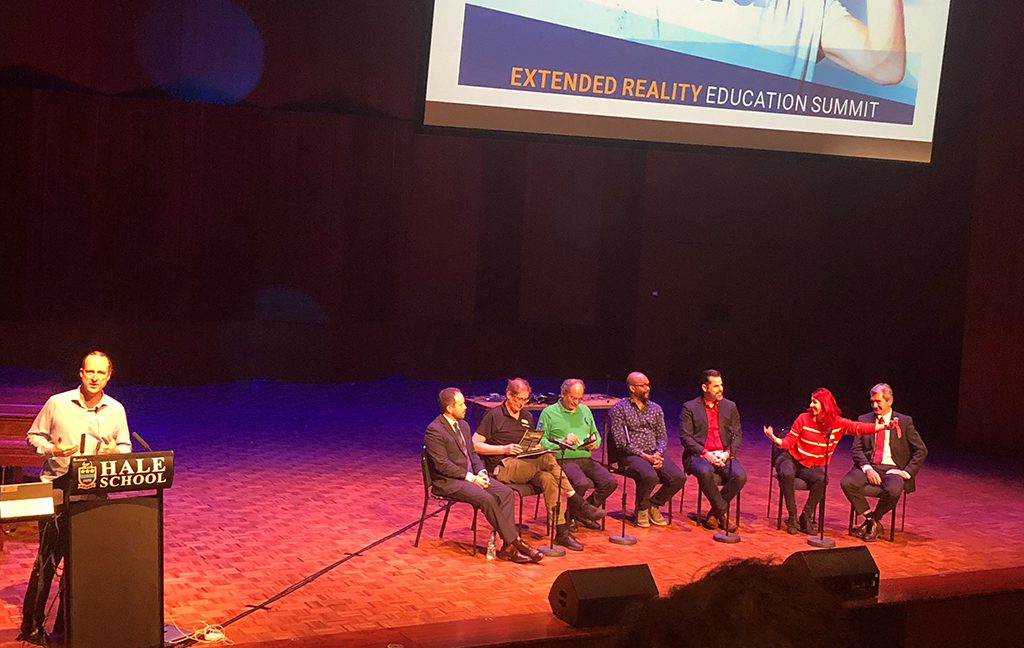
    We were delighted to present the “Industry Perspective” at the inaugural XR.Edu Summit held at Hale School this week. iTRA’s Director, Mark Broome, showcased our experience and innovations to the room of educators giving them a perspective on the business cases for Extended Reality in the real world. We spoke with a number of people afterwards who recognised the value of giving students exposure to #VR #AR #XR and giving them projects with tangible applications.

    “We always overestimate the change that will occur in the next two years and underestimate the change that will occur in the next ten. Don’t let yourself be lulled into inaction.”
    – Bill Gates

    We were delighted to present the “Industry Perspective” at the inaugural XR.Edu Summit held at Hale School this week.  iTRA’s Director, Mark Broome,showcased our experience and innovations to the room of educators giving them a perspective on the business cases for Extended Reality in the real world.  We spoke with a number of people afterwards who recognised the value of giving students exposure to #VR #AR #XR and giving them projects with tangible applications. 

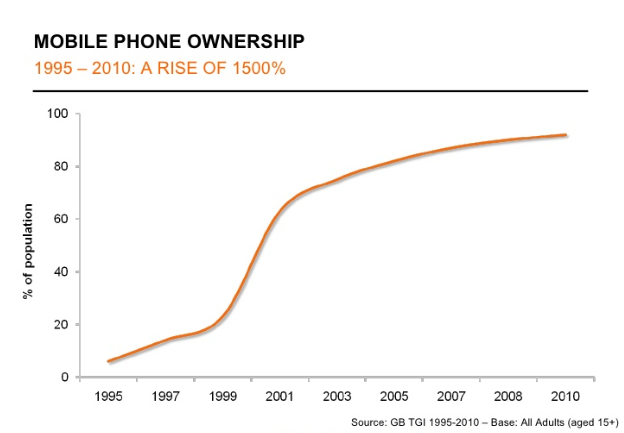
    Mark predicted in the next few years, as the hardware cost reduces and business cases become clearer, we will see an exponential rise in the use of XR applications across all industries.  He rammed home his point with the example of mobile phones to highlight the adoption rate of technology when the elements align:

    As early developers iTRA is fortunate to have long term clients that recognise the benefits of including VR training in their suite of tools to improve the skills of their workforce. We have been developing XR applications since 2017 and continue to identify areas within our clients’ businesses where tangible improvements can be made with VR or AR applications.

    Our experience shows that VR is without doubt an ideal training tool for immersion in high risk work environments and a cost-effective alternative for all kinds of training for physical activity, such as use of fire extinguishers, driving, identification of objects, etc.

    AR has enormous potential for improving efficiencies in operations and this has been proven by major companies who have adopted the technology, such as DHL, Toll, and Boeing. Our AR Tagging App is just one application, but AR in Inspection & Maintenance, Operations Training, Remote Collaboration and Working Guides are all areas where AR will save both time and money.

    The XR.Edu Summit presentation was well received by the audience who were looking for inspiration to produce graduates who are ready for the real world – in an extended reality space.

    Please contact us for more information on the use of XR applications within your organisation.

  • Walmart is Embracing Virtual Reality Technology

    Walmart is joining forces with STRIVR to create a state of the art training platform using the best of Virtual Reality technology.

    Walmart is joining forces with STRIVR to create a state of the art training platform using the best of Virtual Reality technology. The announcement was made during Walmart’s annual shareholder meeting. STRIVR is a VR based startup company based in Menlo Park. They have worked with companies such as PepsiCo as well as professional sports leagues such as the NFL.

    During the meeting Walmart stated that it has been employing STRIVR’s technology in 31 of its training academies recently. This has proved very successful and Walmart hopes to roll out the program to all 200 of its academies.

    A few years ago Walmart opened its very first training academy. Each is connected to a Walmart Supercenter and provides all employees in the general area with a classroom setting to learn for two weeks before starting an entry-level job or new role.

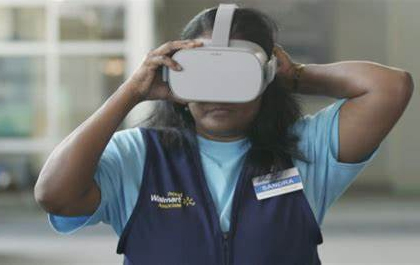
    Using the latest Oculus headset, STRIVR’s technology lets the employees experience real-world scenarios. This means employees can prepare virtually for any situation they might deal with in the workplace, such as a highly crowded situations like Boxing day sales, or just cleaning up a spilt drink that a clumsy customer dropped on the floor.

    Another advantage of using this type of training is that the instructor can see exactly what the student can see, which means if there is something the student missed, the instructor can quickly pick up on the issue and let the student know in real time what they have missed and how to address the issue. Other students can also see and weigh in/take tips from the overall performance of their peers. This can be a great learning tool as one can learn from others’ mistakes.

    STRIVR was co founded by assistant football coach Derek Belch alongside professor Jeremy Bailenson back in 2015. Bailenson concluded that VR training was the future as it was proven to be a much more dynamic and in depth way of learning, the trainee is more likely to retain knowledge gained from simulations rather than from a training video. VR training is a more tactile way of learning.

    Virtual Reality technology has improved significantly over the last decade. This has lead to more widespread use in many sectors, especially in job training situations. Major oil companies have embarrassed this technology the most. We are also seeing major leaps in the health sector, helping train physicians in complex operation procedures, which has been seen over the last few years especially.

    Mary Meeker, who is partnered with Kleiner Perkins said in a small article that she expects VR job training to be very important and will be gaining momentum in the coming years. She also spoke of STRIVR’s great success with Stanford football.

    Walmart is expecting more than 100,000 of its new employees will go through its Academy training in due course. They have said this will be “an integral part of that experience.”

    With major players like Walmart joining the VR training revolution, its certain that other major retailers will adopt this style of training, as the benefits from VR training have been proven time and time again.


  • Navy Demonstrates The Spectrum Hunter Using Augmented Reality Technology

    You would think that having state of the art technology on the battlefield would give you a significant advantage? Well think again, as the more tech you use, the more likely your crew will be detected from the RF used to communicate. There is a saying that always rings true in the armed forces. “If your transmitting, you can be found”.

    You would think that having state of the art technology on the battlefield would give you a significant advantage? Well think again, as the more tech you use, the more likely your crew will be detected from the RF used to communicate. There is a saying that always rings true in the armed forces. “If your transmitting, you can be found”.

    While on duty, armed forces are often equipped with many communication devices such as GPS, mobile devices, SOS beacon, hand-held radios, or Wi-Fi, with these devices emitting their own radio frequency traceable back to the sender. This means that a lot of personnel participating in active battles will have to turn off their devices to avoid detection as its important to be invisible to the enemy.

    Currently to ensure transmitting devices are secure, soldiers use a handheld tablet weighing over 4 Kilograms. The device is equipped with a handheld radio to scan for and identify their own frequencies. While this device does come under the banner of portable, it’s still very heavy and can be a pain to use. Not only that, it forces the operator to take his/her eyes off the battlefield in order to scan, which can be risky in a live battle.

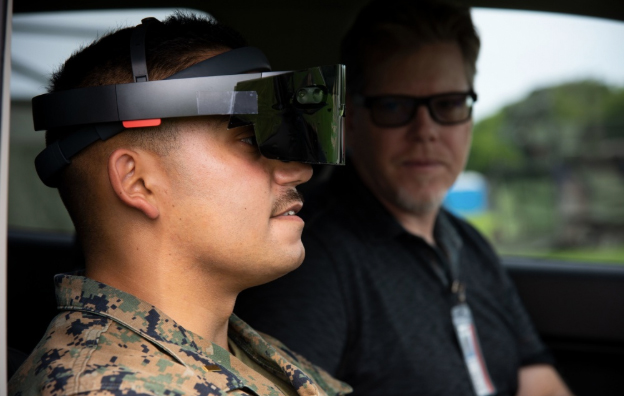
    With the downfalls of the current technology, a Naval Information Warfare Center (NIWC) Atlantic team, is currently developing and testing a new transmission detection system that utilizes Augmented Reality technology. It projects visuals over the user’s real-world environment providing an accurate hands free way of detecting their own RF waves. This new system is dubbed ‘The Spectrum Hunter’

    Operators have a few ways to use and communicate with this device, such as voice recognition technology, and can interpret physical hand gestures. This allows the user to easily locate and deactivate RF transmissions, but at the same time have an active eye on the field looking for danger.

    In an article for Naval Information Warfare Center Atlantic Public Affairs, Sinclair says “The Spectrum Hunter system under development is hands-free. As the user packs a similar-but-smaller geolocator receiver in a backpack and wears a headset inside a helmet that allows them to ‘see’ images of RF waves on an augmented reality screen superimposed over heavy sunglasses,” and also adds “The helmet is fitted with a sunshade so the equipment operates outdoors.”

    NIWC Atlantic Acting Executive Director Peter C. Reddy adds.“The sky is the limit for potential uses for Spectrum Hunter.” and “Augmented reality can enable an operator to more quickly and easily locate the source; this is a paradigm shift toward capabilities of the future.”

    In the future, the Navy hopes to build on and expand the use of its Spectrum Hunter. In time it is hoped that this technology will be used to detect the enemies RF waves as well. “Our team is initially focusing on detecting handheld radios and will expand the scope later to detect cell phones and other devices,” Sinclair explains. “In the future, we plan to modify it to identify RF waves emitting from enemy forces.”

    The prototype of The Spectrum Hunter was showcased last July at Marine Corps Base Camp Lejeune, North Carolina. During this exercise, experts from more than 35 government agencies and industries were able to brainstorm potential insights on how they see this project and where it can go.


  • The AR office space with Magic Leap One

    Augmented Reality has been around for a while now, with there being lots of new uses for this technology, from mockup workplaces to state of the art simulations.


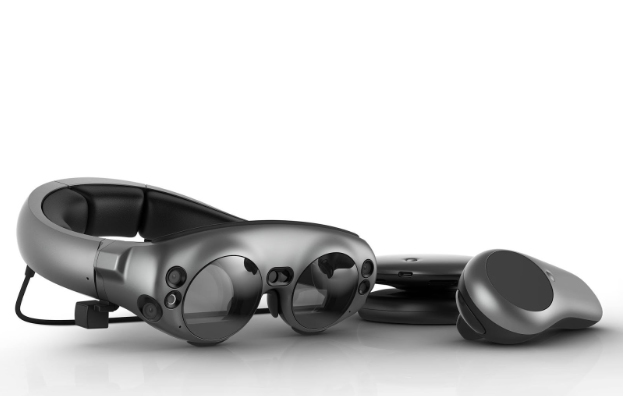
    Augmented Reality has been around for a while now, with there being lots of new uses for this technology, from mockup workplaces to state of the art simulations. It surely is time to utilize this technology in an office environment. Using the Magic Leap One with its CNN app, this combination can allow you to setup an AR space, anywhere, anytime.

    Magic Leap One has been on the market for about a year now. Surprisingly this device hasn’t really hit the mainstream, at least not yet. One thing is for sure, every office could use a bit of livening up with some cool AR products. Magic Leap one is a viable tool for the average white-collar office worker.

    AR Workspaces Are the Future

    The Magic Leap One offers an easy to use truly immersive experience, using wearable AR technology. It’s easy to see how tech like this can enhance your everyday experience of the world around you. Using this technology in the office can improve productivity just by making the most mundane tasks more enjoyable.

    Generally an office space will consist of a whole lot of monitors, mice, keyboards and whiteboards enabling workers to multitask various activities. Now think about donning a headset and having everything you need at your fingertips at all times. Sure, it seems pretty unfamiliar to put something on your head and view the world around you in an altered state. But if you were to really think about it, it makes sense, as you can see exactly what is needed at any time using AR technology. This saves workers time and increases productivity.

    The Magic Leap can be used with other users easily. One of its best features is its ability to put AR holograms in your vision that look pretty realistic. Unlike VR, which closes you off from the world, AR lets you remain engaged with real people and places. Also, although increasing numbers of white-collar workers are working remotely, the working world is still dominated by people in office spaces.

    Magic Leap works best with a high speed internet connection, public wifi such as cafes lack the internet gusto needed. Also noted is that the headset gives off some heat in operation, but as long as your office is air conditioned this will not affect comfort in use. The Magic Leap also comes with a shoulder strap which is very useful when using the device for long periods of time.

    Apps to Use Within Your AR Desktop Setup

    The most important thing to consider when setting up a virtual office with the Magic Leap One, is figuring out which apps make the experience the best it possibly can be. Some apps that work well together are: the Cheddar news video streaming app, Clock app, Wallpaper app via Screens app, Gallery app, Avatar Chat and of course Helio (the AR web browser). When you put all these apps together you get a truly immersive and fun workspace.

    Another useful feature of the Magic Leap One is the ability to force a particular screen to “follow” you wherever you go. The following functionality is in the menu of most Magic Leap apps and can be initialized by clicking on the front-facing bumper.

    With these apps working together, the experience is deep and surprisingly non-distracting. An AR environment that can turn a normal, dull working space into a colorful center of activity.

    If we want to talk about drawbacks, the main one would be its limited battery life, a common problem shared by all mobile devices. In an AR office setup battery life won’t last much longer than 3 hours. This isn’t necessarily a bad thing as it’s a good idea to take a break after a few hours. The Control device consumes much less power if you’re not constantly using it, so it requires much fewer recharges. While on the subject of battery life, it can be inconvenient to have to open the main menu and navigate to the battery icon, just to find out how much power the device has left. Once the Magic Leap drops to 25% power left you will be shown a warning of low battery life.

    Is it worth it?

    The Magic Leap AR office setup may not be everyone’s cup of tea, but for someone with a boring job or limited work space, this might just be the setup. It’s easy to see co-working spaces offering the Magic Leap One as an optional menu item, allowing visitors to create their own virtual space among unaffiliated workers. Because of the relatively opaque effect of the AR panels and the ability to plug a pair of normal headphones into the device, it’s easy to create a bubble of AR constructs amid a crowd of fellow co-working space users.

    People are getting seasoned to the idea of wearing a headset, You won’t necessarily get weird looks by wearing the Magic Leap One in a public setting, though you still might get the occasion look of “what’s that thing on your head?”. People really are now ready for the AR future.

  • Introduction of iTRA’s App, “Tager”

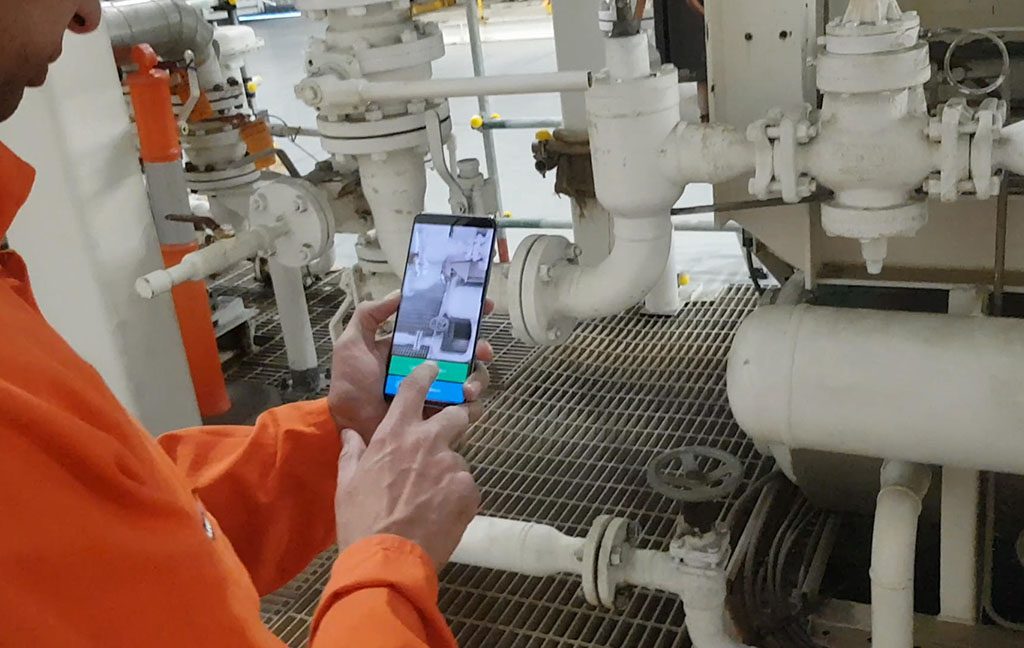
    iTRA are in the development stage of a new App named “Tager” which allows the user to electronically tag items (hence the name). Currently, development is targeting a process to support and enhance the electronic PTW system and also as a potential replacement of QR codes.

    iTRA are in the development stage of a new App named “Tager” which allows the user to electronically tag items (hence the name). Currently, development is targeting a process to support and enhance the electronic PTW system and also as a potential replacement of QR codes.

    The App can be used on any (intrinsically safe) mobile device, with Tag entries directly visible to the process controller / Permit Authority.

    The App essentially works on item and environment recognition. Once the designated item is identified, the user applies the App (tap of a screen) with that “Tag” transferred directly to a database or control system.

    Whilst the existing Permit to Work system remains essentially unchanged, Tager would add an additional layer of control. A Permit Authority, using a device, applies the Tag to the process, plant or equipment, linked to relevant supporting documentation. This Tag can only be applied and removed at the PTW site, not remotely.

    The electronic Tag interfaces with the existing PTW but also locks out the process, plant or equipment.  The process / plant / equipment cannot be re energised until the electronic Tag is removed by the Permit Authority.

    Tager may also be used to enhance or replace the more traditional QR code. Tager would electronically interface with existing processes and not only provide direct visible access to information imbedded in a QR code but overcomes a significant QR Code weakness – longevity of the Code in harsh environments.

    Early days, but the results are promising.